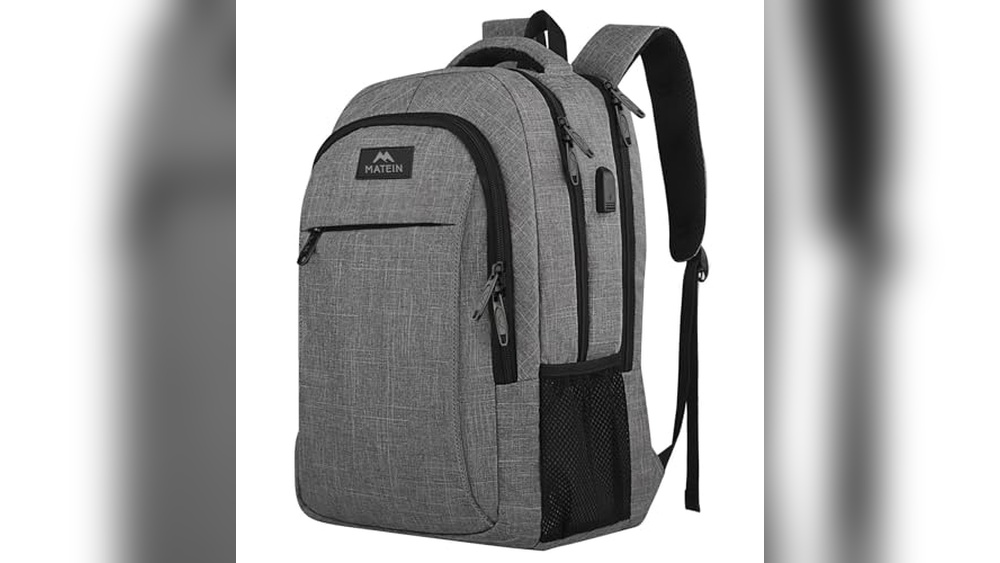
Have you ever wondered how the USB port on your backpack actually works? It’s more than just a cool feature—it’s designed to keep your devices charged and ready while you’re on the move.
Imagine never having to hunt for an outlet again or worrying about your phone dying when you need it most. You’ll discover the simple technology behind USB backpacks and how they can make your daily life easier. Keep reading to unlock the secret to staying powered up wherever you go.
Usb Charging Basics
USB charging on a backpack lets you power devices on the move. It works by connecting your device to a power source inside the bag. The USB port on the backpack is linked to a power bank or battery pack held inside. This setup makes charging easy without needing to open the bag or find a wall socket.
Understanding USB charging basics helps you use these backpacks better. Knowing the types of USB ports, power delivery standards, and charging speed factors can improve your charging experience. Let’s explore these key points.
Types Of Usb Ports
USB ports come in several types. The most common are USB-A, USB-C, and Micro-USB. USB-A is the traditional rectangular port seen on many devices. USB-C is smaller, reversible, and supports faster charging and data transfer. Micro-USB is older and mostly found on older devices. Backpacks usually feature USB-A or USB-C ports for compatibility.
Power Delivery Standards
Power delivery (PD) standards control how much power a USB port can send. Basic USB ports provide 5 volts and up to 2 amps of current. USB PD allows higher voltage and current, enabling faster charging. Some backpacks support USB PD to charge devices like tablets and laptops. Knowing the power delivery standard helps match your device’s needs.
Charging Speed Factors
Charging speed depends on several factors. The power output of the power bank matters most. Higher output means faster charging. The cable quality also affects speed; thicker wires carry more power. Device compatibility plays a role too. Some devices limit how fast they can charge. Using the right port and cable ensures efficient charging.
Usb Integration In Backpacks
USB integration in backpacks brings great convenience for people on the move. It lets users charge devices without carrying separate power banks in hand. This feature is practical for travelers, students, and professionals alike. Understanding how these USB systems work can help you choose the right backpack. Here is a closer look at the main parts involved in USB integration.
Built-in Power Banks
Some backpacks come with built-in power banks inside a special pocket. These power banks store energy and allow direct charging of devices through the backpack’s USB port. Users only need to keep the power bank charged for continuous use. This setup offers a neat and compact solution for device charging on the go.
External Power Source Setup
Many USB backpacks do not include a power bank. Instead, they have a USB port connected to a cable inside the backpack. Users must connect their own power bank to this cable. This option gives more flexibility in choosing a power bank with desired capacity and brand.
Cable Management Features
Good USB backpacks have built-in cable management. This includes small loops or compartments to organize charging cables neatly. Proper cable management keeps cables from tangling and protects them from damage. It also makes charging easier and more efficient during travel.
Smart Charging Technologies
Smart charging technologies make USB ports on backpacks safe and efficient. They help charge devices faster while protecting batteries. These features improve user experience during travel or daily use. Let’s explore how these technologies work.
Automatic Voltage Adjustment
Automatic voltage adjustment changes the power output to match your device’s needs. It prevents damage caused by too high or low voltage. This keeps your device safe and helps it charge faster. The backpack’s USB port senses the device’s voltage and adjusts accordingly.
Device Recognition
Device recognition identifies the type of gadget connected. It knows if it is a phone, tablet, or other device. This helps the backpack provide the correct power level. Device recognition prevents slow charging and saves battery life.
Overcharge Protection
Overcharge protection stops charging once the battery is full. It avoids battery overheating and damage. This feature extends the lifespan of your device’s battery. The USB port in the backpack automatically cuts off power at the right time.
Choosing The Right Backpack
Choosing the right backpack with a USB port is important. It helps you charge devices easily while you travel or work. The right backpack balances style, function, and technology to fit your daily needs.
Capacity And Port Options
Think about how much space you need for your items. Some backpacks have many pockets and compartments. Check how many USB ports the backpack offers. More ports mean you can charge several devices at once.
Durability And Design
Pick a backpack made from strong materials. It should protect your devices and handle daily use. The design should be comfortable and fit your style. Look for water-resistant fabrics to keep your gear safe.
Compatibility With Devices
Make sure the USB port works with your devices. Some backpacks support fast charging and different plug types. Check if it supports your phone, tablet, or laptop. This avoids any issues while charging on the go.
Using Usb Backpacks Safely
Using a USB backpack can be very convenient. It lets you charge your devices on the go. Safety is important to protect your devices and the backpack. Follow simple rules to use your USB backpack safely and efficiently.
Proper Charging Practices
Use the correct charger for your device. Avoid using chargers with too high or low power. Always plug your device gently into the USB port. Do not force the connection. Unplug the device when fully charged to save battery and avoid damage.
Avoiding Overheating
Keep the backpack and devices in a cool place. Avoid direct sunlight or hot environments. Remove the power bank if it feels hot. Do not cover the backpack with thick clothes while charging. Heat can damage the battery and reduce its life.
Maintaining Battery Health
Charge the power bank regularly, even if not in use. Avoid letting the battery drain completely. Store the power bank in a dry and cool place. Check cables and ports for damage before use. Replace old or damaged batteries to keep your backpack safe.
Troubleshooting Common Issues
USB ports on backpacks add great convenience for charging devices on the go. Sometimes, these USB setups face common issues that disrupt their use. Troubleshooting helps fix problems quickly without stress. Below are some typical problems and easy ways to handle them.
Connection Problems
Loose or damaged cables often cause connection issues. Check both ends of the USB cable. Make sure it is firmly plugged into the backpack and your device. Dirt or dust inside the port can block connections. Clean ports gently with a soft brush or compressed air. Try using a different USB cable to see if the problem remains. Sometimes, the device’s charging port may be faulty. Test charging with another device to identify the cause.
Slow Charging Causes
Slow charging may happen due to low power output from the power bank inside the backpack. Ensure the power bank supports fast charging. Using a low-quality or damaged cable can reduce charging speed. Replace old cables with new, high-quality ones. Charging multiple devices at once also slows down power delivery. Charge devices one at a time for faster results. The device itself might limit charging speed. Check device settings or battery health for issues.
Power Bank Not Charging
Sometimes, the power bank inside the backpack does not charge properly. Check if the power bank’s input cable is securely connected. Use the correct charger recommended by the manufacturer. Charging through a weak or damaged adapter causes problems. The power bank’s battery may be old and need replacement. Avoid extreme temperatures that can harm battery life. If the power bank still won’t charge, consider professional repair or replacement.
Frequently Asked Questions
How Does Usb Charging Work On A Backpack?
USB charging on backpacks works by connecting an internal power bank to an external USB port. You plug your device’s cable into this port for convenient charging on the go, without opening the backpack. The power bank stores energy and supplies it to your device.
Can I Charge Any Device Using A Usb Backpack Port?
Yes, you can charge most USB-powered devices like smartphones, tablets, and headphones. The backpack’s USB port acts as a pass-through connection to the power bank inside. Just ensure your device uses a compatible USB cable and the power bank has sufficient charge.
Do Usb Backpacks Require External Power Sources?
No, USB backpacks do not have built-in batteries. You need to place a power bank inside the backpack for charging. The USB port connects to this power bank, providing power to your devices through the external port on the backpack.
Is It Safe To Use Usb Charging On Backpacks?
Yes, USB charging on backpacks is safe if you use quality power banks and cables. Most backpacks have insulated USB ports to prevent short circuits. Always avoid overcharging devices and remove the power bank when not in use for safety.
Conclusion
A USB port on a backpack makes charging devices easy. You just connect your power bank inside the bag. Then plug your phone or tablet into the outside USB port. This setup saves time and keeps cables neat. It also helps when you are on the move.
Many backpacks now include this feature for convenience. It suits students, travelers, and workers alike. Understanding how it works helps you use it better. A simple idea that adds real value to your daily carry.