Have you ever wondered what makes Charing Port backpacks stand out from the crowd? If you’re looking for a backpack that combines style, durability, and smart features, you’re in the right place.
You’ll discover exactly how Charing Port backpacks work and why they might be the perfect fit for your daily needs. Keep reading to unlock the secrets behind their design and functionality—and see how they can make your life easier every day.
Charging Port Backpacks Basics
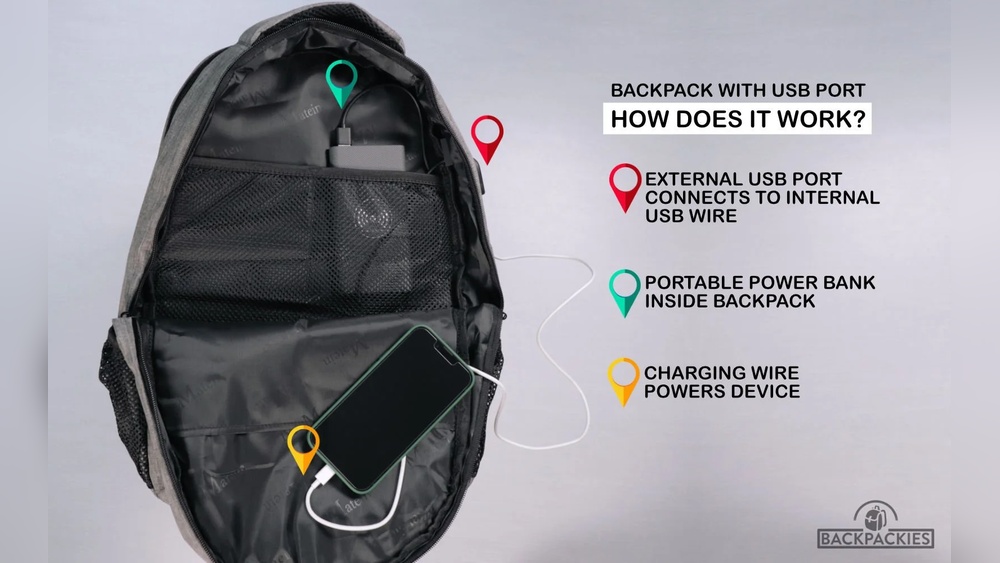
Charging port backpacks are simple yet useful. They help you charge your devices on the move. These backpacks come with built-in ports that connect to power banks inside. This makes charging your phone or tablet easy without carrying extra cables or power banks in hand.
Understanding how these backpacks work helps you use them better. Here are the basics you need to know about charging port backpacks.
Core Components
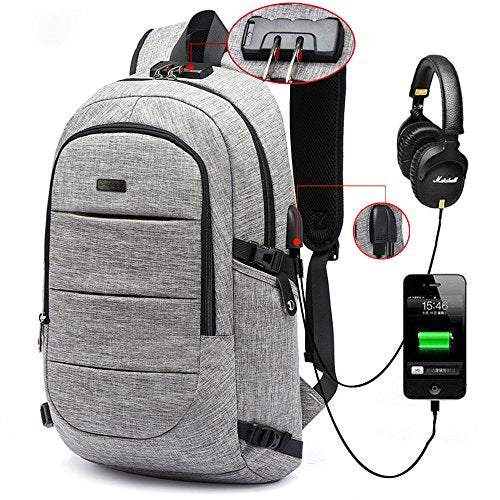
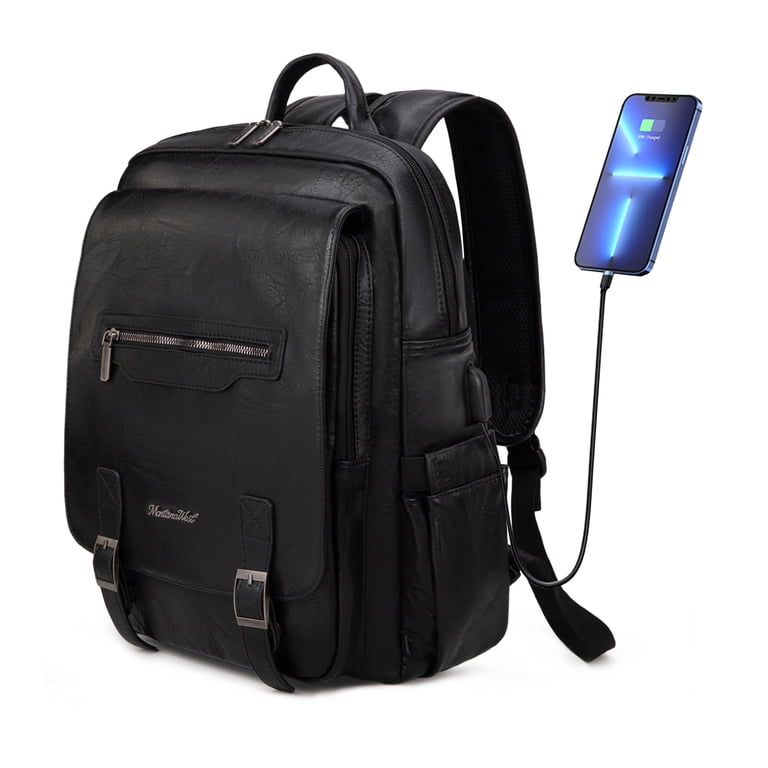
Charging port backpacks have a few key parts. First, the USB charging port is on the outside. It lets you plug in your device’s charging cable.
Inside, there is a cable that connects this port to a power bank pocket. The power bank itself is usually not included. You need to place your power bank in the special pocket inside the backpack.
How Charging Works
Charging starts when you connect your device to the backpack’s USB port. The port transfers power from the power bank inside to your device.
The power bank supplies the energy. You just need to make sure it is charged before you start your day. No need to open the backpack to charge your phone.
Common Features
Most charging port backpacks have extra features. Some have water-resistant fabric to protect your devices. Others offer multiple compartments to organize your gadgets and cables.
Many backpacks include padded straps for comfort. Some come with anti-theft zippers to keep your items safe. These features add convenience and security while charging on the go.
Types Of Charging Port Backpacks
Charging port backpacks come in different types. Each type offers a unique way to keep your devices powered on the go. Understanding these types helps you pick the best backpack for your needs.
Built-in Power Banks
Some backpacks have power banks built inside. This means you can charge your phone without carrying extra devices. The power bank connects to the backpack’s USB port. You just plug your device into the port. This type is very convenient for quick charging.
External Power Bank Compatibility
Other backpacks allow you to use your own power bank. They have a USB port that links to a pocket inside. You place your power bank inside this pocket. This option lets you choose the power bank size and capacity. It gives more flexibility and control over charging.
Solar Charging Backpacks
Some backpacks come with solar panels attached. These panels convert sunlight into energy to charge devices. Solar backpacks are great for outdoor activities. They provide power even when you have no electricity. Solar charging is eco-friendly and useful for long trips.
Key Benefits On-the-go
Charging port backpacks offer several benefits for people on the move. They combine storage and power in one handy bag. These backpacks help keep your devices charged and ready.
Explore the key advantages that make charging port backpacks useful for daily travel and work.
Convenience And Accessibility
Charging port backpacks let you charge devices anytime. No need to find a wall outlet or stop working. Just connect your phone or tablet to the built-in port. It saves time and effort during busy days.
Enhanced Mobility
These backpacks keep you moving freely. Carry your gadgets and power source together. No extra cables or chargers to hold. Great for walking, commuting, or traveling light without losing power.
Device Protection
The backpacks protect your electronics from damage. They have padded compartments that keep devices safe. Your laptop and phone stay secure inside. No worries about scratches or bumps while charging.
Credit: www.luggagefactory.com
Choosing The Right Backpack
Choosing the right charging port backpack matters for daily use and travel. These backpacks combine style with technology. They let you charge devices on the go. Picking one depends on your needs and habits. Three main points help you decide.
Battery Capacity
Battery size affects how long you can charge devices. Larger batteries power phones or tablets several times. Smaller batteries are lighter and easier to carry. Choose a battery size that fits your device use. Check if the battery is removable or built-in. This affects charging convenience and backpack weight.
Port Variety
Different devices need different charging ports. Some backpacks have USB-A, USB-C, or even wireless charging pads. USB-C is fast and works with many new devices. USB-A fits older devices and accessories. More ports mean more devices can charge at once. Pick a backpack with ports that match your gadgets.
Design And Comfort
Comfort is key for daily wear. Look for padded straps and back panels. Good airflow helps reduce sweating. The backpack should have enough space for your laptop and essentials. A sleek design fits school, work, or travel. Choose a style that feels good and looks right for you.
Using And Maintaining Your Backpack
Using and maintaining your charging port backpack is simple and important. Proper care helps your backpack last longer and work better. You can keep your devices powered and your backpack clean with a few easy steps. Follow these tips to enjoy your backpack every day.
Charging Your Devices
Plug your device’s charging cable into the backpack’s USB port. Connect a power bank inside the backpack to the internal cable. This setup lets you charge devices on the move. Keep your power bank fully charged before leaving home. Use the correct cable for your device to avoid damage.
Battery Care Tips
Charge your power bank regularly, even if not in use. Avoid overcharging by unplugging once full. Store the battery in a cool, dry place. Do not expose the battery to heat or water. Replace the power bank after many charge cycles for safety.
Cleaning And Storage
Wipe the backpack with a damp cloth to remove dirt. Avoid harsh chemicals that can damage fabric and ports. Remove the power bank before cleaning. Store the backpack in a dry place when not used. Keep it away from direct sunlight to prevent fading.
Popular Brands And Models
Charging port backpacks have become popular for their convenience and style. Many brands now offer models with built-in charging ports. These backpacks let you charge devices on the go without carrying extra cables or power banks in hand. Different brands focus on design, battery capacity, and durability.
Choosing the right brand and model depends on your needs and budget. Some backpacks focus on tech features while others emphasize comfort and space. Here are some popular options that users prefer.
Top-rated Options
Brands like MATEIN, Kopack, and Tigernu lead the market. MATEIN offers backpacks with USB charging ports and anti-theft designs. Kopack models have water-resistant fabric and multiple compartments. Tigernu backpacks combine style with strong charging features. These backpacks suit daily commuters and travelers alike.
Price Ranges
Charging port backpacks vary widely in price. Budget options start around $30 and offer basic charging ports. Mid-range backpacks cost $50 to $100 and include better materials and battery packs. Premium models can exceed $150 with advanced security features and larger capacity. Prices reflect the quality and extra features included.
User Reviews
Users appreciate backpacks that charge devices reliably and fit daily needs. Many praise the convenience of built-in ports during travel. Some users mention weight as a concern in heavier models. Comfort and durability are common positive points in reviews. Reading user feedback helps pick a backpack that matches your lifestyle.
Troubleshooting Common Issues
Troubleshooting common issues with charging port backpacks can help keep your device powered. Small problems may stop your backpack from working properly. Knowing how to fix these issues saves time and money.
Connection Problems
Check the cable connection first. Loose cables cause power interruptions. Clean the charging port gently to remove dust and dirt. Use a soft brush or cloth. Avoid using sharp objects that may damage the port.
Try a different cable to rule out cable damage. Sometimes, the problem is the charger, not the backpack. Restart your device to refresh the connection.
Battery Not Charging
Make sure the battery is properly inserted. A loose battery will not charge. Check the power source to ensure it works. Low power outlets can cause slow charging.
Allow the battery to cool if it feels hot. Overheating can stop charging. Use the recommended charger for your backpack. Wrong chargers may not supply enough power.
Port Damage
Look for bent or broken pins inside the charging port. Damaged pins can block power flow. Avoid forcing cables into the port. This can cause serious damage.
If the port is damaged, contact a professional for repair. Do not try to fix it yourself. Using a damaged port can harm your device or backpack further.
Credit: www.walmart.com

Credit: www.youtube.com
Frequently Asked Questions
How Do Charging Port Backpacks Charge Devices?
Charging port backpacks have built-in USB ports connected to an internal power bank. You plug your device’s charging cable into the external USB port, which transfers power from the power bank inside the backpack to your device, allowing convenient on-the-go charging.
Can I Use Any Power Bank With Charging Backpacks?
Yes, most charging port backpacks are compatible with standard USB power banks. You simply connect your power bank inside the backpack to the internal cable. However, ensure the power bank fits the backpack’s designated compartment for safety and convenience.
Are Charging Port Backpacks Safe To Use?
Charging port backpacks are generally safe if used correctly. Avoid overcharging devices and use quality power banks. The backpack design keeps cables secure, minimizing wear and tear. Always follow manufacturer guidelines to ensure safe charging and prevent damage or hazards.
Do Charging Backpacks Add Extra Weight?
Charging port backpacks may weigh slightly more due to built-in cables and compartments for power banks. However, the added weight is minimal and balanced. The convenience of charging your devices on the go usually outweighs this slight increase in weight.
Conclusion
Charing Port backpacks combine style and smart design well. They carry your items safely and keep you comfortable. The many pockets help organize things easily. Their lightweight build makes travel less tiring. You don’t have to worry about charging your devices.
These backpacks suit daily use and trips alike. Choosing one means convenience on the go. Simple, practical, and useful. A backpack that works as hard as you do.