Is your Gregory backpack feeling uncomfortable or unbalanced? Knowing how to adjust it properly can make all the difference in your comfort and support.
When your backpack fits just right, you can carry your gear effortlessly and avoid unnecessary strain on your shoulders and back. In this guide, you’ll learn simple steps to customize your Gregory backpack to fit your body perfectly. Keep reading to discover how a few quick adjustments can transform your hiking or daily carry experience for the better.

Credit: www.youtube.com
Choosing The Right Gregory Backpack
Choosing the right Gregory backpack is key to a great hiking or travel experience. A good backpack fits well, feels comfortable, and meets your needs. This guide helps you pick the perfect Gregory backpack.
Backpack Types And Uses
Gregory offers backpacks for many activities. Daypacks are small and light for short trips. Hiking packs are bigger and have many pockets. Travel backpacks have secure compartments for your gear. Choose a type that matches your main use.
Sizing For Your Body
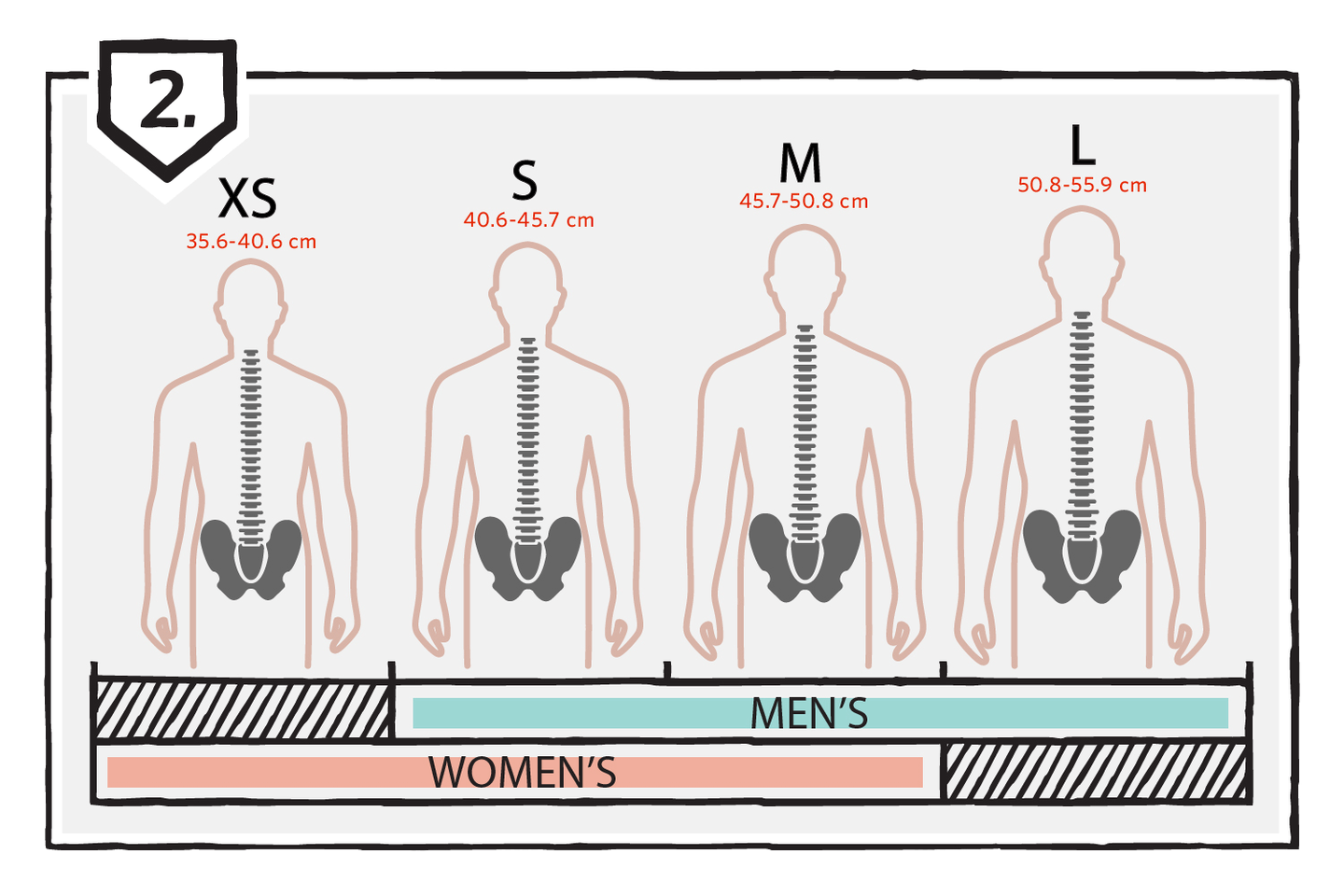
Pick a backpack size that fits your torso length. Gregory backpacks come in different sizes. Use a tape measure to check your torso length. A well-sized pack reduces strain on your back and shoulders. Try the backpack with weight before buying.
Features To Consider
Look for padded shoulder straps and hip belts for comfort. Ventilated back panels help keep you cool. Check for adjustable straps to customize the fit. Water bottle pockets and rain covers add convenience. Choose features that suit your activities and style.
Initial Setup Before Wearing
Before wearing your Gregory backpack, setting it up properly is key. This step helps you carry the pack comfortably and safely. It reduces strain and keeps your posture correct. Spend a few minutes on this initial setup. It makes a big difference on your hike or daily walk.
Loosening Straps
Start by loosening all the straps. Shoulder straps, hip belt, and load lifters should be loose. This gives you room to adjust after packing. It also helps you wear the backpack easily. Tight straps at the start can cause discomfort and poor fit.
Packing For Balance
Pack your backpack with balance in mind. Place heavy items close to your back and center. Light items go toward the outside or top. Balanced packing stops the bag from pulling you backward. It helps keep your body steady on rough paths.
Checking Weight Distribution
Check the weight spread inside the backpack. The goal is even weight on both sides. Uneven load causes muscle strain and fatigue. Lift the pack slightly and feel the balance. Rearrange items if you notice one side is heavier.
Adjusting Shoulder Straps
Adjusting the shoulder straps of your Gregory backpack is key to comfort. Properly fitted straps help carry weight evenly. This reduces fatigue and prevents pain on long hikes or daily use.
Focus on making small changes for a better fit. Tighten or loosen straps to suit your body shape. Pay attention to how the straps sit on your shoulders.
Proper Strap Length
Start by loosening the shoulder straps completely. Put the backpack on and stand straight. Pull the straps down slowly to tighten. Stop when the pack feels snug but not tight. The straps should hold the backpack close to your back. Avoid straps that are too long or too short.
Aligning Straps With Shoulders
Check if the straps sit flat on your shoulders. They should follow the natural curve of your body. Straps should not dig into your skin or slide off. Adjust the angle if the straps feel uneven. Proper alignment keeps the backpack stable during movement.
Avoiding Shoulder Pressure
Ensure the straps distribute weight evenly on both shoulders. Padding on the straps helps reduce pressure points. Do not overtighten, as it causes discomfort. Loosen straps if you feel pinching or numbness. Shoulder pressure can lead to pain and poor posture.
Fitting The Hip Belt
Fitting the hip belt on your Gregory backpack is key for a comfortable carry. The belt helps move weight from your shoulders to your hips. This reduces strain and makes hiking easier. Follow clear steps to position and secure the belt properly. Learn how to spread the load evenly on your hips.
Positioning On Hips
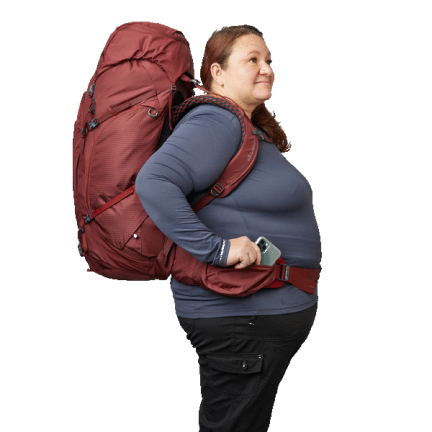
Place the hip belt so the pads rest on the top of your hip bones. The belt should wrap around your hips, not your waist. This position supports your body’s weight correctly. Check that the belt sits low enough to avoid pressure on your stomach.
Securing The Belt
Fasten the buckle in front of your hips. Pull the straps snug but not too tight. The belt must feel firm yet comfortable. Avoid leaving the belt loose or overly tight to prevent discomfort and chafing.
Distributing Weight To Hips
Adjust the belt to transfer most weight to your hips. Your shoulders should feel lighter once the belt fits well. This balance helps prevent back pain on long walks. Tighten or loosen the straps to find the right support.
Using Load Lifters And Stabilizers
Using load lifters and stabilizers on your Gregory backpack helps balance the weight. These straps keep the pack close to your body. This reduces strain on your shoulders and back. Proper adjustment improves comfort and hiking efficiency.
Purpose Of Load Lifters
Load lifters connect the top of the shoulder straps to the pack. They pull the pack upward toward your back. This helps keep the load from pulling you backward. It also shifts weight from shoulders to hips. This makes carrying heavy loads easier.
Adjusting Load Lifters
Start with the load lifters loose. Tighten them by pulling upward gently. Stop when the pack feels snug but not tight. The load lifters should create a 45-degree angle. Avoid over-tightening, which can cause discomfort.
Tightening Stabilizer Straps
Stabilizer straps sit near the top of your hip belt. They pull the pack closer to your hips. Tighten these straps evenly on both sides. The goal is to keep the pack stable during movement. Avoid making them too tight to prevent pain.
Credit: eu.gregorypacks.com
Fine-tuning For Comfort
Fine-tuning your Gregory backpack is key for all-day comfort. A well-adjusted pack fits your body perfectly. This reduces strain on your shoulders and back. It also keeps the weight balanced for easy carrying.
Small changes can make a big difference. Adjust your backpack step-by-step for the best fit. Focus on torso length, balance, and movement. These steps help you enjoy your adventure without pain.
Adjusting Torso Length
Start by setting the torso length. Gregory backpacks have adjustable straps or panels. Find the right length to match your back size. A correct torso length keeps the pack close to your body. This improves support and prevents the pack from swaying.
Measure your torso if unsure. Adjust the straps so the shoulder harness sits comfortably on your shoulders. Avoid too tight or too loose settings. Your pack should feel secure but not restrictive.
Balancing Front And Back
Next, balance the load between the front and back. Use the hip belt to shift weight to your hips. This takes pressure off your shoulders. Tighten the shoulder straps after securing the hip belt. This keeps the pack stable and close to your body.
Check the load lifter straps. Adjust them to pull the top of the pack closer. This keeps the weight centered. Balanced weight reduces fatigue and improves posture.
Testing Movement And Fit
Finally, test how the pack moves with you. Walk around and bend down several times. The pack should stay in place without shifting. Check for any pressure points or discomfort.
Adjust the straps again if needed. Small tweaks help prevent soreness. Keep testing until the pack feels natural and secure during movement.
Maintaining Your Backpack Fit
Maintaining the right fit for your Gregory backpack ensures comfort and support on every trip. A well-adjusted backpack reduces strain and keeps your gear secure. Small tweaks over time keep the pack feeling just right.
Rechecking Adjustments Regularly
Check your backpack fit before each use. Straps can loosen or shift with movement. Make sure the shoulder straps sit comfortably without digging in. The hip belt should wrap snugly around your hips. Adjust the load lifters to balance weight properly. A quick check prevents discomfort on long hikes.
Adapting For Different Loads
Change your backpack fit based on the load you carry. Heavier loads need tighter straps for better support. Light loads allow for looser adjustments and more movement. Shift the pack higher or lower to match your body shape. Keep the weight close to your back to avoid strain. Small changes improve comfort and balance.
Cleaning And Care Tips
Clean your backpack regularly to keep it in good shape. Use mild soap and water to wipe down straps and fabric. Avoid harsh chemicals that can damage materials. Let the backpack dry completely before storing. Store it in a cool, dry place away from direct sunlight. Proper care extends the life of your backpack and keeps it fitting well.
Credit: www.gregory.com
Frequently Asked Questions
How Do I Adjust The Shoulder Straps On A Gregory Backpack?
To adjust the shoulder straps, loosen the straps by pulling up. Position the backpack so it sits comfortably on your shoulders. Then, pull the straps down until the pack feels snug but not tight.
What’s The Best Way To Fit The Hip Belt Properly?
Position the hip belt over your hip bones. Tighten the belt by pulling the straps forward. This transfers the pack’s weight to your hips for better support and comfort.
How Can I Adjust The Torso Length On My Gregory Backpack?
Locate the torso adjustment system on the back panel. Slide the harness up or down to match your torso length. Secure it firmly to ensure the backpack fits your body shape correctly.
Why Is Adjusting The Load Lifters Important?
Load lifters help balance the weight of the pack. Tighten them so the pack leans close to your back. This improves stability and reduces shoulder strain during long hikes.
Conclusion
Adjusting your Gregory backpack helps you carry weight with comfort. Tighten straps step by step and check the fit often. A well-fitted backpack reduces strain on your back and shoulders. Take your time to find the right balance and feel.
Enjoy your hike or travel with less pain and more ease. Small changes can make a big difference in how you carry your gear. Keep practicing these tips for a better backpack experience every time.