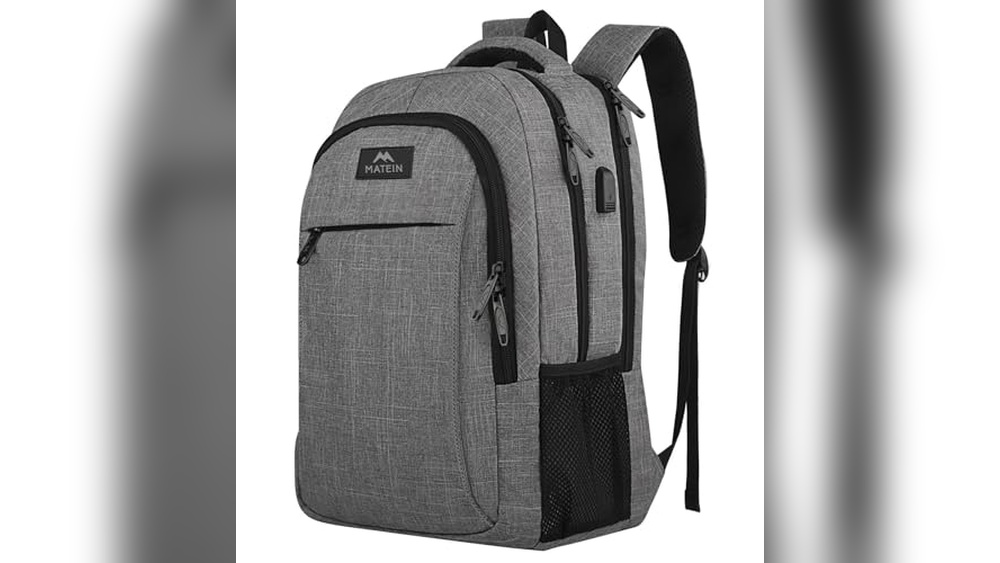
Are you tired of worrying about your belongings when you’re on the move? An anti-theft backpack with a USB port is designed to keep your stuff safe and your devices charged.
But how do you get the most out of it? In this guide, you’ll discover simple steps to use your anti-theft backpack USB feature effectively. By the end, you’ll know exactly how to protect your valuables and stay powered up wherever you go.
Keep reading to unlock the full potential of your backpack!
Credit: arcticfox.com
Choosing The Right Anti Theft Backpack
Choosing the right anti theft backpack is important for safety and convenience. The perfect backpack protects your belongings and fits your daily needs. It should be easy to carry and offer smart features. Focus on quality, size, and security to find the best option.
Key Features To Look For
Look for hidden zippers and lockable compartments. These keep your items safe from pickpockets. A built-in USB port helps charge devices on the go. Water-resistant materials protect your gear from rain. Comfortable straps and back padding make carrying easy. Reflective strips add visibility in low light.
Material And Build Quality
Strong, durable fabrics last longer and resist tears. Nylon and polyester are common for anti theft backpacks. Check for reinforced stitching at stress points. The zippers should be smooth and sturdy. A solid frame helps keep the backpack’s shape. Water-resistant or waterproof coatings add extra protection.
Size And Capacity Considerations
Choose a size that fits your daily items comfortably. Small backpacks suit light travel or city use. Larger packs work well for laptops and books. Avoid backpacks that are too bulky or heavy. Multiple compartments help organize your belongings. Balance size with comfort for all-day wear.
Setting Up The Usb Charging Port
Setting up the USB charging port on your anti-theft backpack is simple and quick. This feature lets you charge your devices easily while on the move. The setup requires just a few steps to ensure it works properly and safely.
Locating The Usb Port
First, find the USB port on the backpack. It is usually on the side or near the top. The port connects to the inside of the backpack. This design keeps your devices safe while charging. Look for a small, covered opening where you can plug in your cable.
Connecting Power Banks Safely
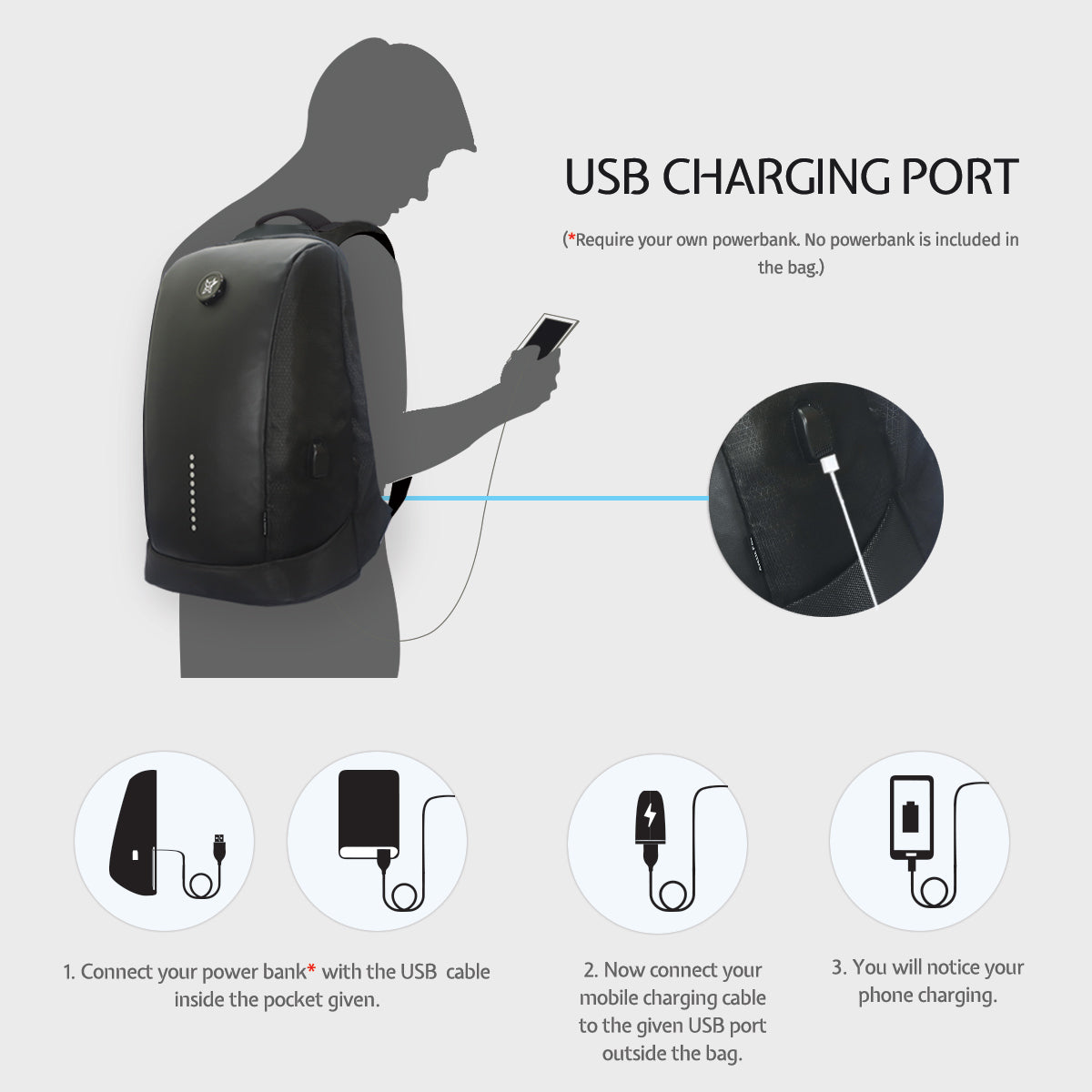
Next, place a power bank inside the backpack. Use the internal cable to link the power bank to the USB port. Make sure the power bank is fully charged before use. Do not overload the power bank or use damaged cables. Secure the power bank in a pocket to prevent movement and damage.
Cable Management Tips
Keep cables neat to avoid tangles and damage. Use small straps or clips inside the backpack to hold cables. Coil extra cable length carefully. Avoid sharp bends or twists in the cables. Good cable management makes charging easier and extends cable life.
Maximizing Security Features
Maximizing the security features of your anti-theft backpack USB keeps your belongings safe. These backpacks come with smart designs that protect your items from theft. Learning how to use these features fully makes your travel or daily commute worry-free.
Locking Mechanisms Explained
Anti-theft backpacks have special locking systems. These locks secure zippers together to stop quick openings. Some bags use combination locks. Others have hidden locks that need a key or code. These locks make it hard for thieves to access your bag.
Hidden Pockets And Compartments
Many backpacks include secret pockets inside. These spaces hide wallets, phones, or passports safely. They are often placed inside the bag or under flaps. Hidden pockets keep valuables out of sight and reach. They add an extra layer of protection against pickpockets.
Cut-resistant Materials
Anti-theft backpacks use strong materials that resist cutting. The fabric may have metal wires woven inside. This stops thieves from slashing the bag open. Cut-resistant materials help keep your belongings secure in crowded places. They add peace of mind during your travels.

Credit: www.amazon.com
Daily Use Tips For Convenience
Using an anti-theft backpack with a USB port daily can make your life easier. Small habits help you get the most from this smart bag. Organizing well, charging devices, and proper care keep the backpack working smoothly. Here are some easy tips for daily use.
Organizing Your Items
Keep your backpack tidy by using its compartments. Store small items like keys and wallet in inner pockets. Place books and tablets in padded sections. Use mesh pockets for cables and chargers. This saves time and protects your things from damage.
Charging Devices On The Go
Connect your power bank inside the backpack to the USB port. Plug your phone or tablet into the outside port. Charge safely while walking or sitting. Avoid overloading the power bank to keep it working longer. Unplug devices when fully charged to save battery.
Maintaining The Backpack
Clean the backpack regularly with a soft cloth. Avoid harsh chemicals that can ruin the fabric. Check zippers and locks for smooth use. Store the backpack in a dry place after use. Fix small tears or loose threads early to prevent bigger damage.
Travel And Commute Best Practices
Traveling and commuting with an anti theft backpack USB requires smart habits. These backpacks protect your belongings and charge your devices. Use practical tips to stay safe and keep your items secure. Follow these best practices for smooth travel and daily commute.
Securing Your Backpack In Crowded Areas
Always wear your backpack in front in busy places. Keep the USB charging cable hidden to avoid drawing attention. Use the lockable zippers to close all compartments tightly. Avoid placing your backpack on the floor or behind you. Stay aware of your surroundings and watch for suspicious behavior.
Using Anti Theft Backpacks In Airports
Keep your backpack close and in sight at all times. Use the built-in USB port for charging without opening the bag. Place valuable items in compartments with hidden zippers. Move slowly and stay calm during security checks. Carry only essentials to reduce the risk of theft.
Avoiding Common Theft Scenarios
Do not leave your backpack unattended, even for a moment. Avoid using your phone or other devices openly in crowded places. Do not share your travel plans or routes with strangers. Choose seats or spots where you can see your bag clearly. Use the anti theft features fully to deter thieves.

Credit: www.swissgear.com
Troubleshooting Common Issues
Anti theft backpacks with USB ports are very useful for charging devices on the go. Sometimes, small problems occur that can stop the USB port from working well. This section helps solve common issues quickly. It saves time and keeps your backpack useful.
Usb Port Not Charging
Check the power bank inside the backpack first. Make sure it is charged and working. Use a different charging cable to rule out cable damage. Clean the USB port gently with a dry cloth. Dirt or dust can block connections. Try plugging your device directly into the power bank. This helps find if the problem is the port or power bank.
Dealing With Wear And Tear
Daily use can cause wear and tear on your backpack. Look for loose threads or small tears early. Fix small issues with needle and thread to avoid bigger damage. Protect your backpack from heavy rain and sharp objects. Use a cover or a separate bag for extra protection. Regular care extends the life of your backpack and its USB parts.
Replacing Parts And Accessories
Some parts like cables and power banks can wear out. Buy replacement cables that match your backpack’s USB port. Choose power banks with the same size and voltage. Remove old parts carefully to avoid damage. Keep spare parts in your bag for emergencies. Replacement parts keep your backpack working well and ready to use.
Frequently Asked Questions
How Do I Charge My Devices With An Anti Theft Backpack Usb?
Connect your device’s charging cable to the backpack’s external USB port. Inside, plug the cable into a power bank. This setup lets you charge devices on the go without opening the backpack, keeping your belongings safe and your devices powered.
Can Anti Theft Backpacks Protect Against Pickpockets?
Yes, anti theft backpacks use hidden zippers and lockable compartments. These features prevent easy access by pickpockets. The sturdy construction and secret pockets keep valuables secure, making them ideal for crowded places and travel.
How Do I Use The Usb Port On An Anti Theft Backpack?
Plug your power bank inside the backpack and connect it to the internal USB cable. Then, use the external USB port to charge your device. This allows convenient charging without opening the bag or exposing your power bank.
Are Anti Theft Backpacks Comfortable For Daily Use?
Most anti theft backpacks are ergonomically designed with padded straps and breathable back panels. They distribute weight evenly, reducing strain. This makes them comfortable for daily commuting, travel, or school while keeping your belongings safe.
Conclusion
Using an anti-theft backpack with a USB port keeps your items safe and charged. Always lock the zippers to avoid theft. Connect your device to the USB for easy charging on the go. Carry your backpack close to your body in crowded places.
This simple habit protects your belongings better. Choose a backpack with hidden pockets for extra security. Stay aware of your surroundings while traveling or commuting. This bag offers both convenience and peace of mind every day. Keep your essentials secure and your devices powered easily.