
Have you ever been out and about, needing to charge your phone, but struggling to find a power source? What if your backpack could solve that problem for you?
Backpacks with USB ports are becoming more popular, and there’s a good reason why. These smart designs make charging your devices on the go easier than ever. If you want to know how this simple feature can change the way you carry your gear and keep your devices powered up, keep reading.
You might just wonder how you ever managed without it.
Credit: www.matein.com
Purpose Of Usb Ports In Backpacks
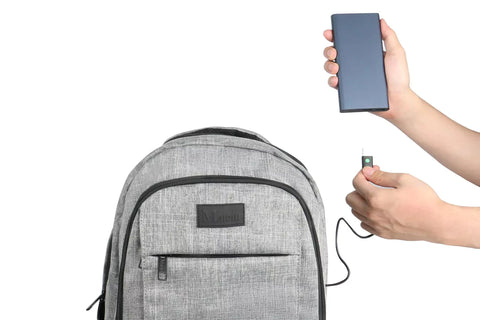
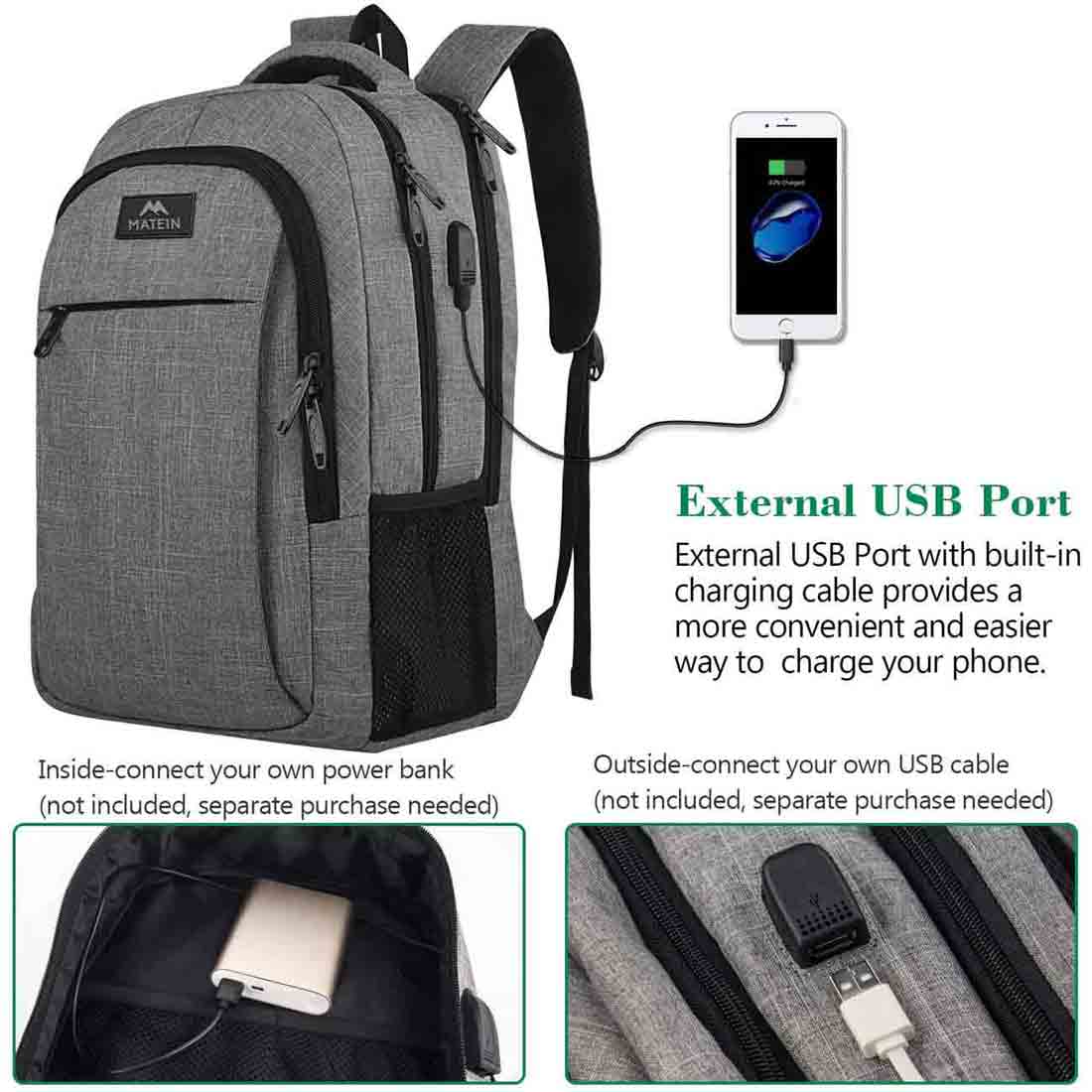
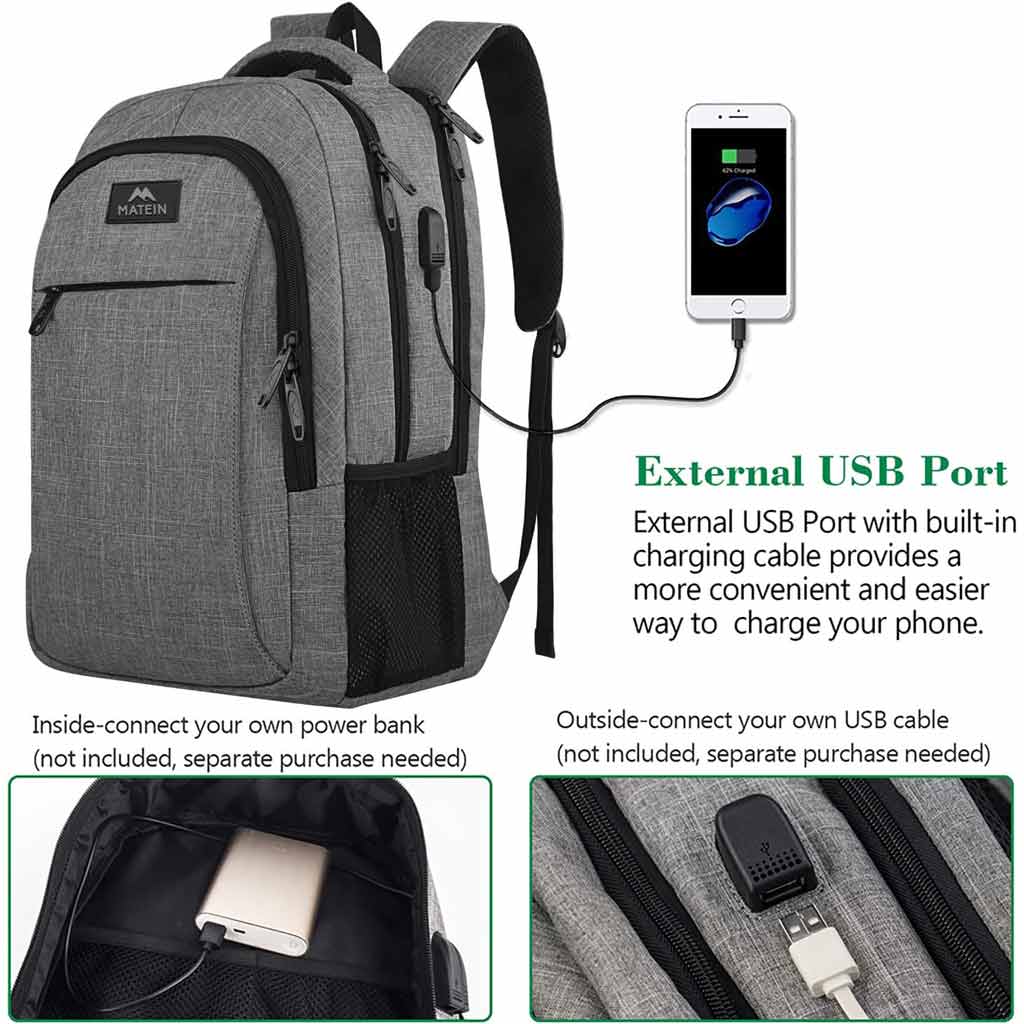
Backpacks with USB ports offer a smart way to carry and charge devices. These backpacks meet the needs of busy people who use gadgets daily. The USB port adds convenience by connecting power banks inside the bag to devices outside.
The purpose of USB ports in backpacks is simple. They allow charging without taking out the power bank. This feature saves time and keeps devices ready for use. It also helps keep cables organized and protected inside the bag.
Charging On The Go
Charging on the go is the main reason for USB ports in backpacks. You plug your device into the external USB port. Inside, the power bank supplies energy without opening the bag. This helps keep devices charged during travel or long days.
It is useful for commuters, students, and travelers. No need to stop and find a power outlet. Just connect your phone or tablet to the USB port. The power bank inside the backpack does the rest.
Seamless Connectivity
Seamless connectivity means easy and quick access to power. The USB port on the backpack connects the power bank to your device. This avoids tangled cords and constant unpacking.
The design keeps cables hidden and safe. It also protects devices from damage or theft. This way, you stay connected without hassle. Your gadgets stay powered without interrupting your day.
How Usb Ports Work In Backpacks
USB ports in backpacks make charging devices easier. They let you connect your phone or tablet without carrying extra cables outside. These ports link to a power source inside the bag. This setup keeps your devices powered on the go.
Internal Power Bank Setup
Inside the backpack, a power bank fits in a special pocket. This battery stores energy to charge devices. The USB port connects to the power bank with a small cable. You just plug your device into the outside port. It draws power safely from the power bank inside.
Port Accessibility
The USB port sits on the backpack’s surface. It is easy to reach without opening the bag. This design lets you charge devices while walking or traveling. You keep your power bank secure inside. The external port protects the cables from damage and tangle.
Benefits Of Usb Port Backpacks
USB port backpacks offer practical benefits for daily use and travel. These backpacks combine style with technology to help keep devices charged. They make life easier by allowing users to charge gadgets on the go without holding a power bank in hand.
Enhanced Convenience
USB port backpacks let you charge your phone or tablet anywhere. You can connect your power bank inside the bag and plug your device into the external USB port. This setup means no need to open the bag or hold a charger while walking. It saves time and keeps your devices ready to use all day.
Safety And Security
Charging devices inside the backpack keeps them safe from theft. You do not have to carry your power bank or phone in your hand. It also protects your gadgets from weather elements like rain or dust. The design helps keep cables organized, reducing the risk of damage or loss.
Travel-friendly Features
USB port backpacks are great for travelers and commuters. They allow charging during long trips without searching for power outlets. Many bags have extra compartments for chargers, cables, and other essentials. This organization helps keep everything in one place and easy to find.
Credit: www.matein.com
Common Uses And Scenarios
Backpacks with USB ports offer a simple way to charge devices on the go. These backpacks suit many daily activities. People use them in different settings to stay connected and keep their gadgets powered. Here are some common uses and scenarios where USB port backpacks shine.
Daily Commutes
Commuters often face long travel times. A backpack with a USB port helps charge phones or tablets during trips. It allows easy access to power without unpacking devices. This feature is useful on buses, trains, or walking routes. It keeps devices ready for calls, music, or navigation.
Outdoor Adventures
Outdoor lovers carry backpacks on hikes or camping trips. USB ports provide a way to charge devices using portable power banks. This keeps phones, GPS devices, or cameras running longer. It helps capture moments and stay safe with a charged phone. The convenience is valuable when outlets are far away.
Student Life
Students carry many gadgets every day. A USB port backpack lets them charge phones or tablets between classes. It helps keep devices ready for study apps or online research. Students can charge devices without stopping their routines. This saves time and keeps them connected throughout the day.
Choosing The Right Usb Backpack
USB backpacks offer great convenience for charging devices on the go. Choosing the right one matters for daily use and travel. Focus on key features to find a backpack that fits your needs.
Consider quality, battery life, and comfort. Each factor affects how well the backpack works for you.
Port Quality And Compatibility
Check the USB port quality first. A strong, durable port lasts longer and charges devices faster. Make sure the port fits your devices. Most backpacks use USB-A or USB-C ports. USB-C supports faster charging and newer gadgets. Choose a backpack with the port type you need.
Battery Capacity
Some USB backpacks come with built-in power banks. Battery capacity shows how much charge you can carry. Higher capacity means more device charges. Pick a backpack with enough power for your daily use. Also, check if the battery is removable for easy charging.
Design And Comfort
Look for a backpack that feels good on your shoulders. Padded straps and back support help during long wear. The design should have enough space for your items and devices. A well-designed backpack balances comfort, style, and usability.
Credit: oldhammam.co.uk
Maintenance And Care Tips
Backpacks with USB ports offer great convenience. They let you charge devices on the move. To keep this feature working well, proper care is key. Follow these simple maintenance and care tips to extend your backpack’s life.
Protecting The Usb Port
Keep the USB port dry at all times. Avoid exposing it to rain or liquids. Use a small cover or cap if your backpack has one. Don’t force cables in or out. Gentle handling prevents damage to the port pins. Store your backpack in a safe place to avoid dust buildup.
Battery Handling
Many backpacks use an external power bank. Charge the power bank fully before use. Remove the power bank if you won’t use the backpack for days. Avoid dropping or shaking the power bank. Use only the recommended charger to protect battery health.
Cleaning Guidelines
Unplug all cables before cleaning. Use a soft cloth dampened with mild soap water. Wipe the backpack gently, focusing on the USB area. Never submerge the backpack in water. Let it air dry completely before storing or using again.
Frequently Asked Questions
Why Do Backpacks Have Usb Ports Built-in?
Backpacks have USB ports to enable easy device charging on the go. They connect a power bank inside the bag to your phone or tablet outside, providing convenient access without removing your power source. This feature is popular among travelers and commuters.
How Does A Usb Port In A Backpack Work?
A USB port in a backpack is connected internally to a power bank pocket. You plug your power bank inside and use the external port to charge devices. This setup allows charging without opening the backpack, improving convenience and accessibility.
Are Backpacks With Usb Ports Safe To Use?
Yes, backpacks with USB ports are safe if used correctly. They rely on your power bank’s safety features. Avoid overloading or using damaged cables. Properly designed backpacks ensure no electrical hazards during charging.
Can Any Power Bank Be Used With Usb Backpacks?
Most USB backpacks support standard power banks with USB output. Ensure your power bank fits the internal pocket and has a compatible USB cable. Check the backpack’s specifications for recommended power bank sizes and types.
Conclusion
Backpacks with USB ports make charging devices easy on the go. They save time by letting you charge without removing power banks. This feature suits students, travelers, and busy workers well. Carrying a backpack with a USB port means less hassle and more convenience.
It keeps your devices ready wherever you are. Choosing one can improve your daily routine and keep you connected. Simple, practical, and helpful—this feature fits modern life perfectly.